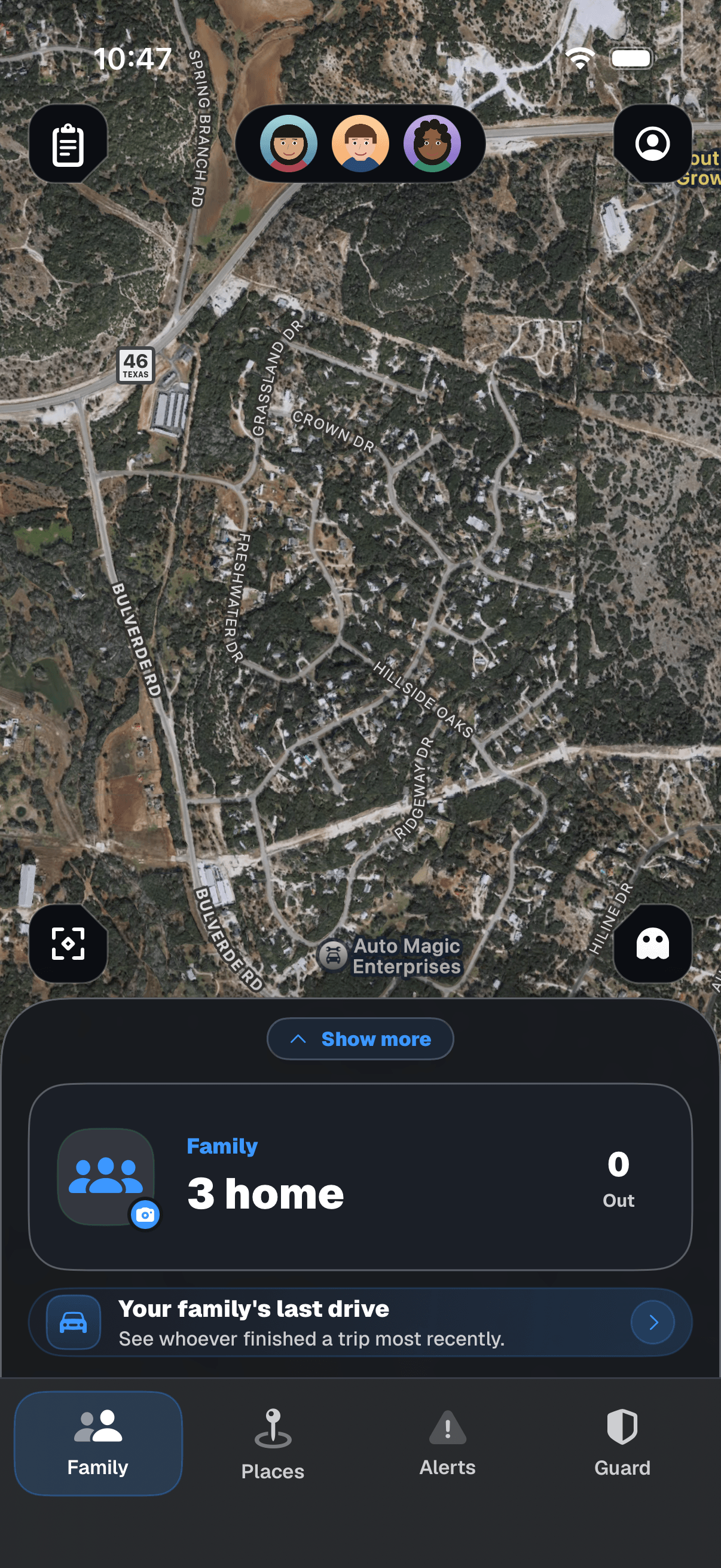
Know where your family is.Know when someone comes to your home who isn’t.
Share family locations, know when they arrive, and keep the next pickup organized. Saber Sensors are in development to flag unfamiliar devices that may signal a new arrival at home.
Family location in the app. Home awareness coming with Saber Sensors.
Public iPhone beta being prepared. Android next. No sensor needed.
SaberAlert for iPhone
Your family map Your shared plans Your choice to share
WHAT IS SABERALERT?
Family location. Home awareness. One connected picture.
A family app you can use on its own. Optional sensors we’re developing for your home. Together, they’re designed to help you understand two parts of the same everyday story.
IPHONE / EARLY ACCESS
The family app
iOS first. Android next on the roadmap.
See the locations your family chooses to share. Know when they reach saved places. Keep pickups, plans, and recent drives together.
Each person joins with their own account
Each person chooses location sharing on their phone
People arrive with phones, watches, cars, and other connected devices. Saber Sensors are being built to recognize familiar wireless activity and flag unfamiliar devices that may signal someone arriving near home.
The connection: the family app helps you know where your people are. Sensors will help you notice new device activity around home—including activity that may come with a visitor.
Know where your family is.
Invite your household. Choose how to share. Use one map, calendar, and family board to keep the day moving. Screens show a sample household.
IN THE APP
See where your family is.
Open the map for the locations your family has chosen to share. Check each update’s time, see who has reached a saved place, and know when it’s time to check in.
THE FAMILY BOARD
Keep the plan together.
Pickups, people, and places. The next family plan, right where you need it.
DRIVES
See how the day unfolded.
Go from a point on the map to a drive you can replay.
SHARING SETTINGS
Make sharing your choice.
Location permissions and sharing controls belong with the person using the app.
COMING WITH SABER SENSORS
Know what belongs. Notice what’s new.
People arrive with more than footsteps. Their phones, watches, and cars can bring wireless signals with them.
Saber Sensors are being developed to detect nearby Wi-Fi and Bluetooth activity, build a picture of familiar devices, and flag an unfamiliar device when it appears. That new signal may be a clue that a person or vehicle is arriving around your home.
NOTICE WHAT’S NEW AROUND HOME
Familiar activity gives context. New devices get your attention.
01 / OBSERVE
Detect nearby devices.
A home sensor listens for Wi-Fi and Bluetooth signals from transmitting devices—such as phones, watches, cars, and connected accessories.
02 / UNDERSTAND
Recognize the familiar.
Your household’s known devices and activity history give the system a picture of what usually belongs around home.
03 / NOTICE
Flag something new.
An unfamiliar device stands out against that familiar picture. A planned Guard update brings it to your attention so you can check in or take a closer look.
THE CAMERA LAYER
See what’s happening.
Your camera provides a visual view of movement and visitors in its field of view.
THE SABER SENSOR LAYER · PLANNED
Notice the devices arriving.
Wireless detection adds another clue that someone may be nearby—and another reason to check your camera.
A new device may mean a new arrival. It cannot confirm someone’s identity, intent, or exact position on your property. Some devices are silent or change identifiers; detection depends on settings, placement, and surroundings.
Know where your people are. Notice what enters their world.
Your family’s shared locations tell one side of the story. Familiar and unfamiliar devices near home tell another. Put them together, and a new arrival can be easier to understand.
ILLUSTRATIVE WALKTHROUGH · SENSORS IN DEVELOPMENTChoose an everyday moment
Shared by your familyAPP
A family member shared an arrival at home.
Location sharing is chosen by each person.
Observed around homePLANNED
Familiar household devices and one unfamiliar device were observed around the same time.
An unfamiliar device may indicate a new arrival.
A familiar arrival. Something new nearby.
See the shared arrival alongside the devices your sensor noticed. The new device might have arrived with a guest, or it might be unrelated nearby activity. You have both sides of the story to review.
These examples show the planned experience. A signal can suggest an arrival, but cannot confirm a person’s identity or intent. Camera footage remains in your camera service.
YOUR FAMILY. YOUR HOME.
Every home is someone’s whole world.
Your people go out into the world. Your home stays at the center of it. We’re bringing family coordination and home awareness together so you can understand more of your everyday life in one place.
THE FUTURE WE’RE BUILDING TOWARD
Technology is becoming part of how we move through life.
The phone in your pocket. The watch on your wrist. The car in your driveway. As people move, connected devices often move with them. Wireless activity is becoming another way to notice change around us. We’re bringing that layer into a family’s view of their world.
CarryWearTravelCome home
Understand your world. Notice when it changes.
We’re working toward a familiar picture of your people, your devices, and the activity around home. When something new appears, you can see it against what you already know—and decide whether it needs your attention.
A fuller picture, with personal boundaries.
Your family’s world should be easier to understand without making every person an open book. That means chosen sharing, clear timestamps, honest uncertainty, and control over who can see what.
Each person chooses what to share. The person paying for a plan doesn’t control anyone else’s location. No ads on any plan, and we don’t sell location data.
One person pays for the household. Everyone they invite gets the plan, and never pays. Duo and Family have the same features; only the household size is different.
Duo and Family open at App Store launch. Try Family free for 14 days. Your household returns to Free unless you choose a plan. Nothing is charged.
No ads. On any plan. Ever.
No card needed
Free
For everyday sharing.
$0 / always
No subscription. No ads.
The family map for two, with arrivals at your two most important places.
Prices are in US dollars and may vary by region. The App Store shows your price before you subscribe. A subscription renews automatically at the shown price each period unless cancelled at least 24 hours before the end of the current period. Payment is charged to your Apple Account at confirmation. Manage or cancel in Settings > Apple Account > Subscriptions. There is no App Store free trial. The organizer can start a 14-day Family preview in the app; it ends without any charge. One person pays for the household. Member counts include that person. One plan covers one household. Duo and Family open when SaberAlert launches on the App Store. The iPhone beta uses TestFlight. Joining the Android waitlist is free and doesn’t start a subscription. iPhone first. Android next on the roadmap. Members under 13 can’t sign up on their own. They join only when a parent or guardian in the household invites them. Saber Sensors are separate from app plans.
Give the people you support a way to stay connected. Explore household sponsorship for your team, nonprofit, school, community or public-service program.
SaberAlert for iPhone is distributed through Apple’s TestFlight. Our public link is set up, but a new beta build is not yet available to install. Check the download page for the invitation and installation steps. There is no iPhone waitlist.
How does family location sharing work?
Invite your household to the app. Each person uses their own account and chooses location sharing on their phone. The map shows their latest shared location and its update time. Saved places can notify you about arrivals. Updates depend on permissions, connectivity, and phone settings; check the timestamp before assuming someone is still there.
Does every family member need to pay?
No. One person pays for the household, and invited members never pay. Duo covers up to 2 people and Family up to 8, counting the person who pays. Each person keeps their own account and sharing settings.
Are there ads on Free?
No. SaberAlert has no ads on any plan, including Free. We don’t sell location data. Paying for a plan doesn’t change anyone’s control over their own sharing.
How much does it cost?
Free costs nothing: the live family map for up to 2 members, arrivals at 2 places and 48 hours of history. Duo is $4.99 a month or $39.99 a year for up to 2 people; Family is $7.49 a month or $59.99 a year for up to 8 people. Both add arrivals at 20 places, 30 days of history and every premium feature. The organizer can try Family free for 14 days in the app, with nothing charged. Prices are in US dollars and may vary by region.
Is SaberAlert on Android?
Not yet. SaberAlert starts on iPhone. Android next on the roadmap. Join the Android waitlist and we’ll email you when you can try it. There’s no Android release date yet.
Can my organization pay for households?
Yes. Employers, nonprofits, schools, communities and government programs can sponsor Family for the households they support, at a published price per household per year. Sponsors see counts only, never a household or its locations.
Do I need a sensor for family location?
No. The family map and everything on your plan use the iPhone app and its location permissions. Saber Sensors are a separate addition for home, coming later.
What will Saber Sensors notice?
Saber Sensors are being developed to detect nearby Wi-Fi and Bluetooth transmissions, recognize familiar devices, and flag unfamiliar ones in Guard. People often carry or travel with connected devices, so a new signal can suggest someone arriving. It is not proof of a person or a complete count: some devices are silent or change identifiers, and detection depends on placement and surroundings.
Will an unfamiliar device mean danger?
No. An unfamiliar signal might come from a visitor, a passing device, or something ordinary nearby. A signal won’t tell you who someone is or what they intend, and no sensor is a guarantee of safety.
How do family location and home sensors work together?
The app helps you know where your family has chosen to share their location. Sensors will help you understand familiar device activity around home and notice new devices that may arrive with a person or vehicle. For example, an unfamiliar signal while everyone is away may be a useful reason to check your camera. Sensor activity will not override anyone’s sharing choices.
Will Saber Sensors replace my cameras?
No. Cameras provide a visual view. Sensors will add context about observable wireless devices, including activity you might choose to check with a camera. They will not show who someone is, record a visual scene, or replace your existing security equipment.
SaberAlert
YOUR FAMILY. YOUR HOME. SABERALERT.
Bring your family into the picture.
SaberAlert for iPhone uses Apple’s TestFlight. Public downloads will open when our next beta build is ready. Android is next on the roadmap.